728x90
Python venv 활성화 후 requirements.txt 패키지 설치중 아래와 같은 에러가 발생했다.
(.venv) C:\...directory_path...> python -m pip install -r requirements.txt
Collecting grpcio==1.66.1 (from -r requirements.txt (line 2))
  Using cached grpcio-1.66.1.tar.gz (12.3 MB)
ERROR: Could not install packages due to an OSError:
[Errno 2] No such file or directory:
'C:\\Users\\...directory_path...\\ESTsoft\\CreatorTemp\\pip-install-wxtnb664\\grpcio_1f3ecbce59c44ae8826f6bac60439c19\\third_party\\boringssl-with-bazel\\src\\pki\\testdata\\verify_certificate_chain_unittest\\intermediate-wrong-signature-no-authority-key-identifier\\generate-chains.py'
HINT: This error might have occurred since this system does not have
Windows Long Path support enabled. You can find information on how to enable this at
https://pip.pypa.io/warnings/enable-long-paths
Windows Long Path 활성화
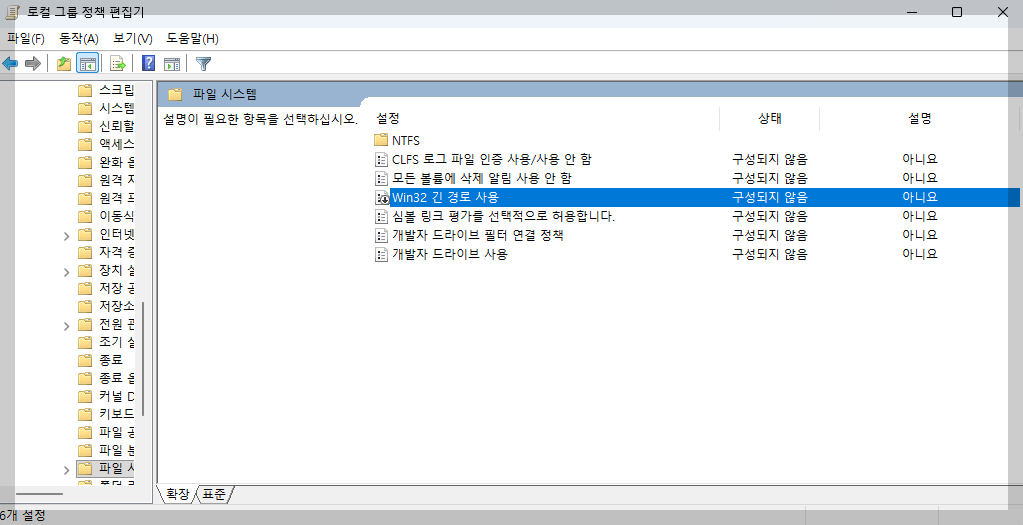
✅ 방법: 로컬 그룹 정책 편집기
- Win + R → gpedit.msc
- 컴퓨터 구성 → 관리 템플릿 → 시스템 → 파일 시스템
- “Win32 긴 경로 사용” 더블클릭
- 사용(Enabled) 선택 → 적용 → 재부팅

728x90
반응형
'Dev Log > Troubleshooting' 카테고리의 다른 글
| [DBeaver] Fail to find a Main Class in "..." (4) | 2025.06.24 |
|---|---|
| [DBeaver/MySQL] Public key retrieval is not allowed. (0) | 2025.06.20 |
| [Elasticsearch/Kibana] docker-compose 설치 및 실행 (0) | 2025.06.20 |
| [WSL] 윈도우에서 우분투 설치 후 도커 설치 (0) | 2025.04.02 |
| [PyCharm] Python (FastAPI) 프로젝트 실행하기 (0) | 2025.04.02 |